
Yesterday, NowSourcing hit the Digg homepage with this post on the difference in negative remarks on StumbleUpon and Digg for about 2 hours. I quickly found that the blog wasn’t ready for the traffic spike. (for those Diggers reading this, here’s your chance to complain with your lame, fail, old news babblings) :).
Here is a list of some good lessons learned the next time you find your blog in a similar predicament:
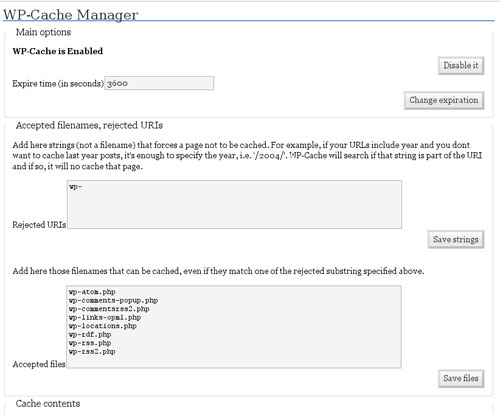
1 – Install and configure the WP-Cache plugin (For WordPress Blogs). WP-Cache is a brilliant plugin that keeps most of your stuff that will load in a static file rather than loading and compiling the PHP on every page request. For the more tech savvy, feel free to tweak to your heart’s content:
h/t to Lyndon for making me think about WP-Cache.
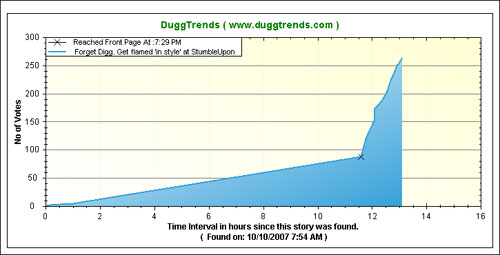
2 – If your site does go down, check out data on all the mirror sites. One such site is Duggtrends. For those of you not familiar with Duggtrends, it’s a great service that people can link to so that the story can still stay alive, and also has some pretty nifty traffic graphs showing before and after your site went hot:
Another great site is Duggback. They aggregate all of the places that your site would have been cached such as Google, Dotcache, and the WaybackMachine. Here is what my story looked like on Duggback. Something else pretty cool that I did was put up a mirror on my wordpress hosted blog. This at least saved some RSS readers, which went up over 60% in one day, an impressive showing.
3 – Tweak your server. This runs on a Linux box, and I did some performance tuning. Won’t bore you with tech details, but there are fewer services running and I also added more RAM to the box. You might want to just go ahead and get a reliable dedicated server if you’re serious about traffic.
4 – Didn’t make the Digg homepage this time? Don’t feel bad. Most sites never do. Something that may help push you over the top next time around is use of the new shout feature (here’s some helpful info on how to use, also an overview on the new Digg features). But please, be kind and only use sparingly: it may cause Diggers to want to reach through the computer screen and strangle you 🙂
I don’t think anything I wrote would get on the Digg front page but this is still very good information. Do you know of any tool or plugin that can let you know if your server has actually gone down? I don’t think I’d have a clue if mine was down unless somebody told me!
@caroline: don’t fret, you’ll get there 🙂
There are many server monitoring tools that can ping your webserver to see if it is alive or not. More complex, non-static sites such as WordPress can also be checked to see the DB connectivity / health.
What I also find that works is trying to go to your own site. If you and others can’t get there, that’s usually a pretty clear sign it’s down 🙂
Write how you swallowed your iPod mixing it up with an apple and you hit the front page big time.
It’s worth adding that some wordpress plugins will kill the server even though wp-cache is used. Typical plugins that do this are the “most popular posts” kind of plugins etc. since they log every page request to the database…
I am going to try out the wp-cache even though I have no fear of getting hit by digg hard … since most of my articles are not yet digg front page material … but still speeding up my page loads would be an advantage to my visitors
@tad chef: yes, let’s think different and keep the server up this time around 🙂
@stefan: you raise an important point. While I typically don’t get into infrastructure discussions on this blog, in this case it is appropriate. My advice to those that are in a situation where their site is getting pounded and about to crash – if you have plugins such as “most popular posts”, consider deactivating them during peak traffic periods.
@giorgosk: good point – you don’t have to wait for Digg-like traffic to speed up page load for your readers. Show people that you are considerate by serving up an optimized page.
Interesting post, my problem though, is that I can’t ever get people do dig my stories. If anybody has any suggestions to increase traffic to my blog, let me know at https://poeticmoney.blogspot.com
@ethan: thanks. Remember that most stories don’t make it anywhere on Digg. There are a number of other stories on here as to how to promote your blog – have a look around. Hope this helps you.
Another approach, if you have a story you know will get traffic, is put it on a lean fast server (all static) for the burst, then when things quiet down, move content back to real site and 301 the inbound links correctly.
That’s the approach we used on
Water Balloon Stunt + Digg Homepage = 33,000 visits in 24 hours
Cheers —
Alan
@alan: thanks for sharing. Also a very good way to get things done. WP_cache will handle of a lot of the requests as static as well, but just remember to turn off any plugins that could slow down the load as well.
Congrats on another successful Digg from your flock post. Good to see your site up 😉